Showing posts with label lumia. Show all posts

Nov 11, 2015

Mirror mirror in the phone...

I was driving this morning in the rush hour traffic with my youngest daughter, when she dug her mascara out of her pocket and exclaimed: "I almost forgot! I had time for only one eye at home, need to swipe some mascara on the other one too." Then she opened the mirror on the window shade, but immediately dismissed it as inconvenient and started to fiddle with her phone.

"Do you have a mirror app there?" I asked her, halfway joking. "Duh! Camera!" was the answer, like only teens can, immediately making me feel stupid and old. "Um, righ, yeah. How stupid of me."

Just out of boredom, sitting there in the non-moving traffic, I took out my Lumia, opened the app store and typed in "mirror". To my astonishment there actually was a loooong list of mirror apps! I mean, I had already laughed at myself for forgetting that the front camera was a (im)perfect mirror indeed, but apparently a whole lot of app makers had had the same vanity thought of having a mirror app in the phone.

Just out of curiosity I installed the first one on the list, a free mirror app, and tried it. So I saw my face on the screen, the app using the front camera I assume (what would the option be anyway? a reflecting blank screen?). So now I have a mirror app in my Lumia. Never has my reflection been as grainy as it is in this mirror ;) The Lumia820 front camera is pretty sucky.

Sep 21, 2014

Updating to Lumia Cyan - WinPhone 8.1

'Twas the third windows phone update in two weeks. Microsoft had been pushing one to my Lumia 820 every Friday for three Fridays in a row. The first one announced itself as Lumia Black (and in all due honesty, the update might have been available for some time already for it had not notified me and I only noticed the update then). It made no major changes that I would've noticed. The second one didn't even have a name, so I guess it was just a patch pack instead of an os upgrade. The third one upgraded my phone to Lumia Cyan. And that brought on a whole lot of stuff.

First thing I noticed after the upgrade was that a tile was missing from my start screen. At first I couldn't remember what it was, for I didn't have the need for it. Then I realized. I was missing something as crucial as the calendar! I looked for it in the app list. Nope, no calendar. I checked my accounts and yes, calendar was supposed to be synced too from our company Exchange. I started to google. I found out that this disappearing calendar was actually a known bug, one of many, with the nice solution to it: do factory reset.

At this point a friend of mine commented to my Facebook status complaint: " If it ain't broken, don't upgrade it". And my husband: "Next time google for experiences before running an upgrade". Duh! But hey, they're supposed to be tested and ok. And besides, if everyone waits for other peoples' experiences, there never will be any. I'm sort of used to go head on to new stuff, because of my job. So here I am, writing a blog post for the behalf of those who actually do wait and read first. Anyway, I have no regrets.

So, I had to do the factory reset. So? It took me probably less than an hour, thanks to the cloud backups that restored almost everything to my phone after the reset. I think there were a couple of apps and a couple of app settings that weren't restored. And the main thing there was that my calendar reappeared. I had tried to avoid the reset by downloading a different calendar app (tried two of them actually), but since the calendar of the os was messed up, I only got a read only version of my calendar in those apps, and that's not worth anything, really.

Calendar bug aside, I really like the new stuff the Cyan brought to my phone.

1) Pull down notifications + actions center
That's something I have written about before. With the iOs7 and iPad jailbreak etc. Something I had been used to with the Android and then finally Apple implemented it in the iOs, and now finally Microsoft brought it to the wp8.1. It has four slots for settings quick access buttons and the link to all settings (yey, I don't have to have the settings as a tile anymore!). In the Notification center settings you can set which settings buttond to show, and also control the apps in the notification center, in a rather Apple-y way (then again, there's not that many ways to do it).


2) Start screen options
These are the minor stuff in a way, but then again, it's the stuff that makes the UI more sleek and cool. The ability to customize the home screen a bit more. Actually, I cannot say for sure which update or upgrade it was, for I did not check all of the settings after the previous ones - only now when the factory reset sort of made it mandatory to go through it all. 

Anyway, now there is the option to use your own photo as a background for tiles - it's a no-scroll photo that is only shown in bits and pieced as the no-scroll background of transparent tiles. Also, now there is the option to fit more tiles on the home screen too. With a phone like Lumia 820, I found the smallest tiles to be so small in this mode that I just passed. I prefer the "old way". 


3) Enhanced volume controls
When you tap once on the up or down volume control buttons, the volume control appears on the top of the screen as before. You can adjsut the ringer + notifications volume using the buttons. But if you tap on the volume control, it opens a bigger control panel, with a slider the ringer + notifications volume and an additional one for the media and apps volume control. It's easy to mute either by tapping on the bell or note icons, and now the vibrate can be easily turned off too.


4) The new calendar UI
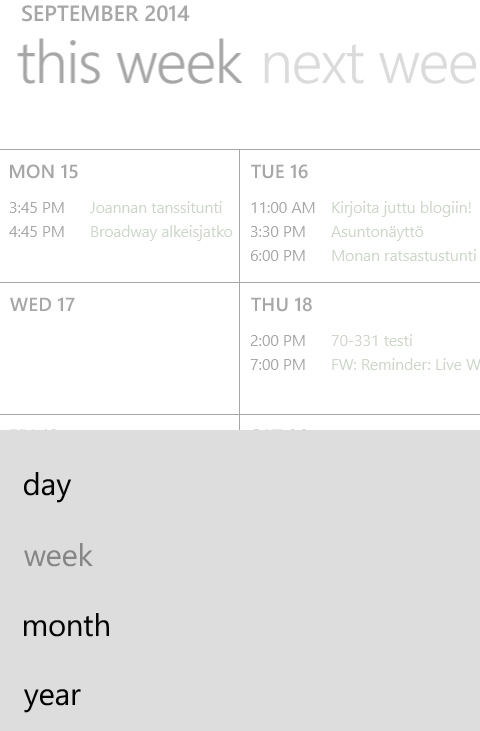
After getting my calendar back, I have to say I like the new and enhanced Windows Phone native calendar with the week view and all. The old calendar constantly agravated me with the slide list view that made it difficult to see whether there were appointments on s specific day or not. It required more than a glance. This new look and feel is nice. There's the options (behind the right-most button on the bottom) to switch from week view to month/day/year views. And it shows some weather data for the upcoming days too, if you allow location on the calendar.


(Oh, we have cool days coming up... autumn is here.)


Summa summarum, I definitely do not regret upgrading my phone despite the need for a factory reset to get it all properly working. I'm quite happy with all the improvements!


Mar 19, 2014

OneNote for Free

Definately worth a share: Microsoft offers OneNote (one of my very favorite apps ever, both in work and personal use) for free on all the most common platforms, except for Unix and Linux. That is, for PC, Mac, Windows tablets, Windows Phone, iPad, iPhone, Android, and the Web. The free version lacks some corporate features like e.g. connections to SharePoint and Outlook.

OneNote is excellent for keeping your notes organized and shared between your devices. I myself use it on PC, iPad and Lumia (820), sharing&syncing the notebooks via OneDrive (Pro) and it works excellently. I have my travel plans, the kids' school schedules, work projects, work notes etc. all in OneNote workbooks and it's easy to find what I'm looking for and check things wherever I am on my phone etc. Sales pitch ;) But I truly do love it!

http://thenextweb.com/microsoft/2014/03/17/microsoft-launches-free-onenote-mac-freemium-onenote-windows-onenote-cloud-api-apps/#!Aw8tf

Download OneNote: http://www.onenote.com/

Mar 4, 2014

About Videos

I have a very ambivalent attitude towards videos. I like them when e.g. I miss a performance by one of our girls and I can then see it on video taken by someone who was there to video it. But videos posted in Facebook, or on news sites etc. I don't click almost ever. I like to look at photos much better. Besides, I encouter fundamental problems with videos in more ways than one.

For most of my daily Internet surfing I use my iPad. Work laptop is for work, and home laptop is mostly used by the kids, and way too clumsy anyway when sitting on the sofa relaxing. I use my iPad on the bus for morning news and facebookin, and at home for almost anything I do.

My iPad is jailbroken, and I use the user agent faker with the Safari, for the general better user experience. But this creates a problem with videos: most web sites (including Facebook and Youtube) feed the videos to iOs Safari in HTML5 format, but for the Chrome desktop UA I use, they send them as flash videos. And iPad does not support Flash. See where I'm going? I usually don't watch videos because I can't without changing the UA, and it's just not worth it. I like still photos and written news better any way any day.

So ok, this is a minor issue, and solely my personal problem (though I generally don't even consider it more than a nuicanse - I believe in one HTML5 standard anyway and think videos should be served as such anyway). But the thing that really ticked me off today, was my futile attempt at getting some videos out of my Lumia (820, don't think that actually matters) and onto my iPad so that I could a) share the video in Facebook and b) more importantly use it in a blog post.

Was it easy? No. Did I succeed? So far, no.

Photos are automatically saved to Sky... 'scuse me OneDrive. I fully understand that it is not very economical to be auto-uploading videos, so they remain on my phone until I manually do something with them. Today, I picked the best ones I wanted to save on my hard drive and the one I wanted for that blog post and manually uploaded them to OneDrive. Then I opened OneDrive storage on my iPad and was prepared to download at least that one of them, let's call it dog video, to my iPad.

Did it work? No.

For photos, there is download. But for videos there is only open in another app. Which downloads the video and opens it in some other app. My option were iMovie, Documents and Dropbox. I thought iMovie was a rather obvious choice, and everything went smoothly until the iPad opened iMovie - it told me that only audio files are supported. Um, what?

I tried sending the video to myself in my email, and at first thought that wouldn't work either. I usually use the Gmail app for my gmail, and that had the same options for the video download as OneDrive. But the native iPad mail app came to rescue - there I was finally able to get the video and save it to my camera roll.

So, as for the options of getting videos from your Lumia to some other device/storage, you can either use a laptop and

  1. connect phone to it by cord and copy it in file system or via the dedicated app or
  2. upload video to OneDrive and retrieve it from there on your file system or
  3. send it in email and retrieve it from there on your laptop.

But if you want it on your iPad, you need to send it to yourself in email and use the native Mail app on iPad. Ok, I did not explore the Dropbox option, but I'm guessing it, as a third party app, would work pretty much the same as the OneDrive or Gmail apps.

Much ado over nothing...

P.S. I later discovered that Blogsy does not regard videos in camera roll, nor did it retrieve it from Facebook where I already had shared it straight from my phone, so in order to have my own video in a blog post, I apparently need to go get my laptop after all. Eyeroll.