Showing posts with label winphone. Show all posts

Nov 11, 2015

Mirror mirror in the phone...

I was driving this morning in the rush hour traffic with my youngest daughter, when she dug her mascara out of her pocket and exclaimed: "I almost forgot! I had time for only one eye at home, need to swipe some mascara on the other one too." Then she opened the mirror on the window shade, but immediately dismissed it as inconvenient and started to fiddle with her phone.

"Do you have a mirror app there?" I asked her, halfway joking. "Duh! Camera!" was the answer, like only teens can, immediately making me feel stupid and old. "Um, righ, yeah. How stupid of me."

Just out of boredom, sitting there in the non-moving traffic, I took out my Lumia, opened the app store and typed in "mirror". To my astonishment there actually was a loooong list of mirror apps! I mean, I had already laughed at myself for forgetting that the front camera was a (im)perfect mirror indeed, but apparently a whole lot of app makers had had the same vanity thought of having a mirror app in the phone.

Just out of curiosity I installed the first one on the list, a free mirror app, and tried it. So I saw my face on the screen, the app using the front camera I assume (what would the option be anyway? a reflecting blank screen?). So now I have a mirror app in my Lumia. Never has my reflection been as grainy as it is in this mirror ;) The Lumia820 front camera is pretty sucky.

Sep 21, 2014

Updating to Lumia Cyan - WinPhone 8.1

'Twas the third windows phone update in two weeks. Microsoft had been pushing one to my Lumia 820 every Friday for three Fridays in a row. The first one announced itself as Lumia Black (and in all due honesty, the update might have been available for some time already for it had not notified me and I only noticed the update then). It made no major changes that I would've noticed. The second one didn't even have a name, so I guess it was just a patch pack instead of an os upgrade. The third one upgraded my phone to Lumia Cyan. And that brought on a whole lot of stuff.

First thing I noticed after the upgrade was that a tile was missing from my start screen. At first I couldn't remember what it was, for I didn't have the need for it. Then I realized. I was missing something as crucial as the calendar! I looked for it in the app list. Nope, no calendar. I checked my accounts and yes, calendar was supposed to be synced too from our company Exchange. I started to google. I found out that this disappearing calendar was actually a known bug, one of many, with the nice solution to it: do factory reset.

At this point a friend of mine commented to my Facebook status complaint: " If it ain't broken, don't upgrade it". And my husband: "Next time google for experiences before running an upgrade". Duh! But hey, they're supposed to be tested and ok. And besides, if everyone waits for other peoples' experiences, there never will be any. I'm sort of used to go head on to new stuff, because of my job. So here I am, writing a blog post for the behalf of those who actually do wait and read first. Anyway, I have no regrets.

So, I had to do the factory reset. So? It took me probably less than an hour, thanks to the cloud backups that restored almost everything to my phone after the reset. I think there were a couple of apps and a couple of app settings that weren't restored. And the main thing there was that my calendar reappeared. I had tried to avoid the reset by downloading a different calendar app (tried two of them actually), but since the calendar of the os was messed up, I only got a read only version of my calendar in those apps, and that's not worth anything, really.

Calendar bug aside, I really like the new stuff the Cyan brought to my phone.

1) Pull down notifications + actions center
That's something I have written about before. With the iOs7 and iPad jailbreak etc. Something I had been used to with the Android and then finally Apple implemented it in the iOs, and now finally Microsoft brought it to the wp8.1. It has four slots for settings quick access buttons and the link to all settings (yey, I don't have to have the settings as a tile anymore!). In the Notification center settings you can set which settings buttond to show, and also control the apps in the notification center, in a rather Apple-y way (then again, there's not that many ways to do it).


2) Start screen options
These are the minor stuff in a way, but then again, it's the stuff that makes the UI more sleek and cool. The ability to customize the home screen a bit more. Actually, I cannot say for sure which update or upgrade it was, for I did not check all of the settings after the previous ones - only now when the factory reset sort of made it mandatory to go through it all. 

Anyway, now there is the option to use your own photo as a background for tiles - it's a no-scroll photo that is only shown in bits and pieced as the no-scroll background of transparent tiles. Also, now there is the option to fit more tiles on the home screen too. With a phone like Lumia 820, I found the smallest tiles to be so small in this mode that I just passed. I prefer the "old way". 


3) Enhanced volume controls
When you tap once on the up or down volume control buttons, the volume control appears on the top of the screen as before. You can adjsut the ringer + notifications volume using the buttons. But if you tap on the volume control, it opens a bigger control panel, with a slider the ringer + notifications volume and an additional one for the media and apps volume control. It's easy to mute either by tapping on the bell or note icons, and now the vibrate can be easily turned off too.


4) The new calendar UI
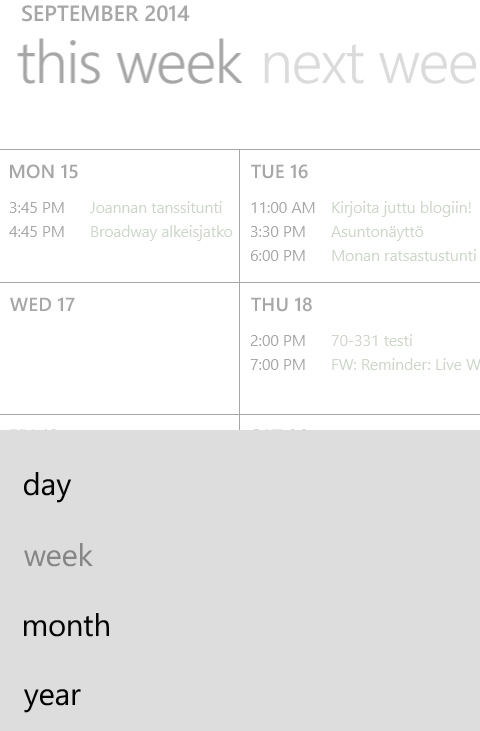
After getting my calendar back, I have to say I like the new and enhanced Windows Phone native calendar with the week view and all. The old calendar constantly agravated me with the slide list view that made it difficult to see whether there were appointments on s specific day or not. It required more than a glance. This new look and feel is nice. There's the options (behind the right-most button on the bottom) to switch from week view to month/day/year views. And it shows some weather data for the upcoming days too, if you allow location on the calendar.


(Oh, we have cool days coming up... autumn is here.)


Summa summarum, I definitely do not regret upgrading my phone despite the need for a factory reset to get it all properly working. I'm quite happy with all the improvements!


Mar 19, 2014

OneNote for Free

Definately worth a share: Microsoft offers OneNote (one of my very favorite apps ever, both in work and personal use) for free on all the most common platforms, except for Unix and Linux. That is, for PC, Mac, Windows tablets, Windows Phone, iPad, iPhone, Android, and the Web. The free version lacks some corporate features like e.g. connections to SharePoint and Outlook.

OneNote is excellent for keeping your notes organized and shared between your devices. I myself use it on PC, iPad and Lumia (820), sharing&syncing the notebooks via OneDrive (Pro) and it works excellently. I have my travel plans, the kids' school schedules, work projects, work notes etc. all in OneNote workbooks and it's easy to find what I'm looking for and check things wherever I am on my phone etc. Sales pitch ;) But I truly do love it!

http://thenextweb.com/microsoft/2014/03/17/microsoft-launches-free-onenote-mac-freemium-onenote-windows-onenote-cloud-api-apps/#!Aw8tf

Download OneNote: http://www.onenote.com/

Oct 27, 2013

Upgrading to Lumia 820

Last week I grabbed the opportunity to upgrade my phone (at least for the time being) from that faithful snowwhite Lumia 800 that's accompanied me to so much, and taken a *few* hits along the way to a new white Lumia 820. Oh, I know it's not a new model anymore, and that there're newer Nokias available, and that it's not high-end, and that there's newer iPhones availble too. But I like the Lumias, and I like the smaller size phones, and as a phone user, I'm not really that demanding.

I think I have listed before the features I most use on a phone (apart of using it as a phone and for texting), but let's approach the Lumia 820 from this point of view. What do I expcect from and appreciate in a phone, and how does the Lumia 820 meet those.

  • Email. No matter how much the media shouts that email is sooo last year because of Lync and Skype and whatnot, it's not. I love both and more, but I could not imagine working in a way where customers Lync m every time they have something to ask or say. Seriously! I need my peace to work. Email gives me the freedom to react when the time's right for me. And it may be in the bus or on the lake side or the sofa in between two episodes of Breaking Bad. And that goes for personal email too. I don't think I need to be available 24/7 - and besides, people can always call me.

As for Lumia 820, it meets my requirements as well as any current smartphone. Nothing new, but then again, no bigger needs either, than to be able to read and reply, search and sync. And I like it that the WinPhones separate different email accounts by deafult, unlike e.g. the iPad.

  • Calendar. I'd be lost without it! I use only one calendar, the Outlook one on the company Exchange server. I use it for work stuff and personal stuff alike. No matter how well Googles and Hotmails and whatnot claim to be able to merge their calendars on different devices into only one, I have realized that for me, this is the only real option in order to keep my mind from being scattered.

Lumia (either one) actuallky would handle the merging ok, but I still want only one calendar. And that is just fine by the phone too ;)

  • Camera. I have a semi-proper camera I use mostly. A Samsung Pro with an ok lense and possibilities for quite ok photos (yes, I'd like a better one, but it's on the very bottom of the priority list of things I'd need or want, because it still works ok for my purposes). And I have a pocked model, some years old cheapie I got in the middle of my divorce, just to have something. That one I use quite rarely. Even more so, since the phone cameras are now more or less as good.

The camera is one of the best features in Lumia 820. It comes with a high-res 8MP camera with focus assist light (a feature well appreaciated by me, for it enalbes taking good quality photos in lesser light without needing to use the flash), options to select the ISO and choose between 16:9 or 4:3 aspect ratio and a few other settings. For a more detailed review, see this TechRadar article about Lumia 820 camera.

Lumia 820 also has an inbuilt (or downloadable, but at least for me, they were readily available) set of different photo lenses, or apps, such as the Nokia Panorama which proved to be a pretty able panorama photo app, Nokia Cinemagraph for creating animated photos (but I think you can only see the effects in the app, not elsewhere) and Nokia Smartcam, with fun effects for capturing movement and then applying one of several ways of handling it, e.g. removing a moving object, or overlapping the frames.

And you can download plenty more.

  • Skype and WhatsApp. I don't launch Lync on my phone almost ever, but I do use Skype on my phone occasionally (my mother lives on the other side of the world) and WhatsApp is the messaging app of choice for my daughters, ever since they had an almost 100€ SMS bill. So I, too, started using it with them, and a few others as well.

As for WhatsApp, it's just WhatsApp. But as for Skype, Lumia 820 has a front camera unlike the 800. And the incoming video was clear and sharp, unlike on ANY other device I've skyped on before!

  • News, both tech and world&local. I used to use Pulse on my phone, for lack of Flipboard. For quite some time now, the phone usage for news has been very rare, for I've used the combination of my iPad and the phone internet sharing in the morning bus. So last time I tried to read the tech news on my phone, I realized there was no Pulse no more. I downloaded Tech News Now app, and actually like it better. Also, I read the local news on Hesari app, and world news in Google news, using the browser.
Lumia 820? Not much difference, naturally. Except for the bigger screen, while the phone is still sleek.
  • OneNote, Googling, Kindle, occasional Youtube, Facebook, Twitter... Apps, apps, apps. Apart from the bigger screen, nothing special about Lumia 820 for those.

Conclusion? I fell in love with the clear a bit bigger screen and the camera - all the while understanding that there are even better ones availbale. I like the little niche feature improvements of WinPhone8 compared to 7.8. Mostly just more options in the settings and such. Oh, and the possibility to use removable storage! Which brings me to my first frustrating encounter with the phone: I needed to refer to the manual to understand where to insert the SIM; you actually need to take the back cover (and the battery) off.


Oct 25, 2013

Juggling between SkyDrive and Dropbox

I can't remember anymore how long I've been using either one of them. But, for long. Not quite as long as they've existed, but almost. To me, a MSN Live user, SkyDrive came first. I don't even remeber if it was called that back then, but who cares anyway. When it was available and came to my attention, I started using it. For what exactly, I don't remember either. It wasn't like I could've used it in my phone, and tablets didn't exist (at least not in the sense of today). But, for something.

The most important thing I tried to use it for, was to share photos between me, my mom and my sister. As for my mom, no prob. She had a Live account too. But for my sister? She's a devoted non-Microsoft person, so nope, no Live account, nor was she about to be getting one. And now, my current husband is the same way. So, so much for sharing in SkyDrive.

My sister was the one who then introduced me (and my mother, on the other side of the world) to Dropbox. I was a bit reluctant at first, mainly because it meant creating yet another account, a password to remember and all that jazz. But that proved to be the exact strenght of Dropbox. No strings attached. In order to have an account, you don't need to become a part of a Micrsoft or Apple or Google network. You just use Dropbox. And sync it on which ever devices you like to use it on.

Back then, when I made my Dropbox account and started to familiarize myself with the desktop app, with the Win Explorer folder, and the Adroid app and all, SkyDrive did not offer all that. It all came along a bit later. So SkyDrive sort of got pushed back, as a storage for OneNote notebooks (works better than with Dropbox) and later on the de facto upload location for my Lumia photos. I stored all my stuff in Dropbox, and eventually started to struggle with space, unwilling to get a 100GB plan or something.


Call me dense, call me what you will, but it was only yesterday, that I realized that I actually could just as well utilize SkyDrive for all my own, non-shared data, and leave Dropbox to be the sharing platform. For the Win Explorer folder is there, and it works perfectly with both my Lumia (duh!) and the iPad (don't know about Android, but then again, my Galaxy Tab has been reduced into a Kindle device nowadays) - and I have all of 25GB of storage space there, complimentary to the 'old' users!

Besides I actually like the SkyDrive app for iPad a bit better than the slightly clumsier Dropbox app. The nice thing about the Dropbox app is, though, that it can be password protected.


Feb 4, 2013

The Pain of Getting WinPhone 7.8

Yes, I still have my Lumia 800.

No, I still don't have Windows Phone 7.8.

What I do have, is Windows phone 7.5, build  7.10.8779.8, which apparently is only the first update file on the way to WP 7.8 (7.10.8858.136) and supposed to be part of a batch that gets installed without the user knowing that the update is actually a set of updates, according to an article in International Business Times.

So how the h*ll, pardon my French, did I end up being one third of the way up to WP7.8?

It's not that long ago that my iPad informed me, that iOs 6.1 update was available. I got the notice pretty much approximately at the same time as any other iPad user, as far as I know. Now, for more than a week already, I have been reading (tweets, obviously, what else) and hearing my friends and aquaintaces,
 right here in this same country, talk about WP7.8 on their Lumia 800.

I am one impatient geek, ok. I get my iOs updates at the same time with the rest of the world, and I want my Win Phone updates that way too!

A complaint in Twitter, and I got an answer: "you need to do the Zune disconnect trick". What is that, now? Sounds funky, don't it? So I googled it and found the instructions. Basically:

  1. turn of the network connenctions on your phone
  2. open Zune
  3. connect phone to computer
  4. search for update; if the newest one isn't readily available -> 
  5. check for updates again but this time
  6. disconnect the computer from the Internet within 3seconds
  7. and the newest update should appear
  8. --> reconnect computer to the Internet and update the phone
When this didn't work for me, I complained it Twitter a bit more and got the instruction to keep on doing this (repeating steps 5-6 until the update appears) for about 30 minutes and eventually it would work. Crazy? Yes. Works? Yes. And no. 

Doing this, maybe not for a half an hour, but some time anyway, Zune eventually, quite reluctantly, offered me that 8779 update, and I thought that it would've then nicely continued to the truly latest update, the actual WP7.8. But nooo. My phone, as well as Zune, was happy with that update. I wasn't.

So I tried that trick some more, to get the rest of the updates, but the ony result I got was my laptop disabling the wifi adapter internally. I seriously sometimes think these devices have a will of their own! It was as if my laptop had grown weary of switching the wireless on again, off again. So it shut the wireless altogether. And for once, also fixed itself when I told it to.

This was the point where I decided to force patience on myself and wait for my phone to announce the update itself, no matter how frustrating it is to wait for it (there is some mostly unrecognizable self-sarcasm hidden in this statement). With an almost 7.8 windows phone. Yeah.

But, pretty pretty please, would it be possible to at least opt the update to anybody checking with Zune, even if the update is availble notfications are rolled out in batches?

P.S. If you want it bad enough, you can do it manually too, but that was like too much ado for me for now.

May 17, 2012

SharePoint on Mobile Devices

SharePoint can be viewed in mobile devices in several different ways. You can go with the OOB mobile view, which you can bypass in your device by manipulating the ?Mobile=1 (--> 0) parameter in the url. Or you can disable the mobile view altogether to bring the full experience to all devices, to the extent that it happens to work - mostly good for public facing sites meant for browsing sites, not working with e.g. documents.

But, who says you can't have both? I personally hate it if a website forces me to a mobile site when using my phone or tablet. Many times, all I want to do is browse the site, the full site, not a listing of libraries. Then again, sometimes that is exactly what I want. HTML5 may (or may not, can't know just yet) solve the problem of mobile views, but then again, will it push users, again, to a forced mobile view?

As for currently, I'm very much pro full site for everybody, and using separate mobile apps for the data browsing. In the Windows Phone 7x, there's the inbuilt Office Hub that does the job, providing straightforward access to the SharePoint library. The other platforms, iOS and Android, need a little help from the apps developers.

The most obvious choice would be the SharePlus app, available for both iOS and Android. The Lite version is free, the pro version costing all of 15,99€. Even with the lite version you can nicely browse the contents of sites - the contents of lists and libraries. On my Galaxy Tab this works just perfectly, but for some reason on the iPad I couldn't access our intranet site using the https.

So on my iPad I needed to come up with something else. I found that the harmon.ie SharePoint app (Lite) didn't mind the https, and works fine. It doesn't seem to show all site content, only libraries (the full version might), but a plus for harmon.ie is that it provides easy access to my own MySite automatically.

Apr 25, 2012

The Ancient Feel


My Galaxy Tab is only 18 months old. It should, by standards of a time already apparently long gone, still be in its prime, a perfectly modern device. But as technology in this stuff goes, it has already started to feel ancient. It's not the size of the screen, nor any sort of bulkiness of physical design. It's the touch experience, the pre-Win7-like-symptoms of the system, the UI deficiensies. It is, de facto, a first generation tablet.

The last real update the Galaxy Tab got, was the Gingerbread. I can sort of understand, that if the technology of a device is insufficient, there is no mind in pushing the newer versions of the operating systems to it. It would only result in even more user frustration, when things only get worse. In some ways, I feel like even updating to the Gingerbread was a mistake. My Tab used to be quite smooth and trustworthy - nowadays it crashes quite frequently and feels somehow tacky to use.

Not only that, but I am quite disappointed by the browsers for the device. The built-in one? I ditched it long ago. I tried Skyfire, Opera Mini, Firefox mobile and latest and currently the Dolphin browser. Dolphin is my favorite one, and so far has been more or less the one to fullfill my needs. But even so, the browsing experience is nowhere near the built-in browser of the iPad, the Safari, of course.


Before buying my iPad I scouted out the other options, i.e. the newer Android based tablets since that was what I'd been using already for a year or so, and there still is no Windows tablet available. Even though they definitely were more sleek than my poor Tab, and - at least in the store ;) - not at all tacky, I still got myself an iPad, and felt defeated. I don't have anything against iPads per se, as I have stated before. My problem is the hype around it, and the loads of sh*t Apple gets away with, simply by being Apple (and, as for now, the maker of the undeniably best tablet so far).

I have high hopes for Win8 tablets. Android as a UI is like Windows in its XP's. Gives you a lot of modification options and enables you to arrange your icons as you like etc. But in the long run, it gets tiresome. In the end, even I just want my apps available with as low maintenance as possible. The iOS does this - but it is high time they get a worthy competitor. So does WinPhone7. And I myself, after using the WinPhone7 UI on my Lumia for these past months, really hope Microsoft in Win8 tablets will redeem their promises. For I like the UI even better than the iOS which I admit to liking quite a lot!

As for my Galaxy Tab? Is it at the end of its lifecycle already then? For sure no! Ok, it's not as sleek and cool anymore as it used to at least feel, but it is still a good device. My iPad is not 3G, but I can insert my second SIM in my Tab. The Tab is more lightweight and slips easily into my purse. I like it as a Kindle device much better than the iPad (holding it leaves dents on my palms...). It's got some cool apps like the Cartoon Camera, that you don't get on iPads. It's got some games my daughters like to play, that you don't get on iPads.

No, time has not flown by my "age old" Android device just yet. But it is a good reminder of how fast the technology is advancing now. And I don't even have a "new" iPad, I have the iPad2. We'll see how old that feels in a year or so.

Feb 27, 2012

Facebook Mobiles

Finally, a mobile Facebook client that I really like! Filpboard doesn't count, since it's not a real FB client, only displaying the news feed. Ah, which one? you ask. I'll tell you. The absolute winner is the Win phone FB app!

On my Android devices and on my iPad, 99% off the times when I open Facebook (which is several times in a day), I use the web page instead of the mobile app. With the Lumia, I was already so disappointed by the mobile apps - plus, Win phone has the People news feed, combining FB and Twitter feeds - that I didn't even think to install the actual WP7 Facebook app.

Until today, when I couldn't access my FB messages any other way, the full web page not functioning properly on the phone for some reason. And it was love at first sight. There is something to be said about the metro UI of the WP7 apps. It simply rocks!


The iPad version is more or less ok too, at least an unquestionable second place.

Feb 8, 2012

OneNote Mobile Apps Review

OneNote is undeniably and without question my all time favorite software application. Especially when combined with Skydrive. Even though there are some slight glitches, or maybe I should say user experience defects, when it comes to the cloud usage; I had a real hard time trying to share my work notebooks via SharePoint and finally resigned to simply store them all in my Skydrive, where my personal one already existed. I even tried Dropbox, but while that is convenient enough on PCs, it doesn't really work on mobile devices.

Hands up, who's not familiar with OneNote and is wondering what the heck am I writing about? Ah, probably those of you didn't even read this far. Ok, hands up, who's wondering what all the fuss is about, it's just a notepad, isn't it? Nope, not just a notepad. It is the most efficient and effortless way I know to make notes on this and that and add images and screenshots and documents and whatnot! to the notebook. Read more on Microsoft's OneNote page.

So, I have my work project information in OneNote, my kids' school schedules and info notes, my travel documents, and all sorts of this and that in OneNote. Already before it was available on any mobile platform, I stored my personal notebook in Skydrive, which enabled me to access it on any laptop I happened to be using (3, on a regular basis; two personal ones and the work laptop). As for last autumn, I had no mobile device on which I could access the notebook. Now I've got three. Oh, rejoice!

Windows phone

The first one, the one with the built-in OneNote app (i.e. Office Hub), was of course my Lumia 800 Windows Mango phone. I didn't really even think of it beforehand, but when I logged in with my WinLive account, as the phone asked me to do, the notebook appeared in my Office Hub. And this further inspired me to share the work notebooks to, as it provided an easy access to different kinds of data without the need to open the laptop.

Naturally the Win phone natively integrated OneNote mobile version is the best one. It allows you to pin notebooks or pages to tiles. It allows you to create and edit notes (pages in notebook sections). You can add to do -lists, numbered and bulleted lists, pictures (either from camera roll or take a new photo) and even audio to the pages. And you can copy-paste text t from e.g. a website to the pages. Pages can also be emailed.

Unfortunately, the phone screen is kinda small for any major note taking and such, so here's one more reason to look forward to the Win8 tablets!

iPad

Then came the iPad. The OneNote app for iPad was released in December last year, and I got my iPad conveniently about a month later. So it was, in fact, among the first applications I installed on the iPad, along with Lync. Out of the three mobile OneNotes, it also holds the second place in features and overall usability - and as for now, the first place in non-OneNote-related usability what with the biggest screen and all.

Like in the Win phone, you can create and edit notebook pages, add pictures from camera roll or take a new photo, add to do -lists and bulleted lists, copy-paste text, and email pages. Numbered lists don't seem to be present, nor audio.

The features that I don't like in the iPad OneNote are that the notebooks are displayed in an apple way as a pop-out sidebar instead of e.g. the starting page. The last viewed page remains open when the app is closed, and the app opens to that page when launched again. I would like to leave the application in the notebook list, not with a page open.

Android

The OneNote Android app was released only today, I could say finally. Since I also have a Galaxy Tab, which I still do use somewhat even while owning an iPad, I jumped at the release and installed the OneNote on my Galaxy Tab. The free version allows up to 500 pages, after which you need to get the full version for a few euros. Only the synced pages count.

The OneNote experience on Android was quite pleasant, the UI resembling the Win phone version more than the iPad one, editing was easy enough with the same possibilities offered as on the other mobile OneNote apps - to do -lists, bullets, numbered list too, the pics from either camera roll or a new photo, and copy-pasting. There is no email page command available though.

The only thing that was a letdown, really, was creating new pages. No matter where I am when creating a new page, it always creates it in Unfiled notes section of the Personal (Web) notebook - which I don't even use, since I already had a personal Skydrive-stored notebook, long before the mobile devices came along. And I can't seem to get rid of this annoying unnecessary and unwanted notebook if I tried - obviously, since the mobile apps want to use it when I don't.

All-in-all

None of the mobile OneNote apps enable moving or copying the pages or sections around. But all-in-all, the basic functions are there, my data from different notebooks is available and easily synced, I can edit the note pages too. Hurray for mobile OneNote - my notetaking in seminars etc. took a huge leap forward with the release of iOs and Android OneNote apps :)

Feb 1, 2012

Article: Apple forcing IT shops to "adapt or die"

As for mobile devices, it is not only the iPad raising these concerns about unmanagability and individuality. I have heard many IT department people say that they cannot let their company's employees have Windows phones for the same reasons - even though in Finland we don't even have a culture of the super-managed BlackBerries (they don't exist here, we have Nokia).

Jan 23, 2012

UI highlights and letdowns

Overall UI and screens
Got to say, I like the Win tiles best. There's the list of applications, and there's the tiles. And I can add more than just apps as tiles. The tile can be a contact person, the live tile showing the person's picture and latest social media updates. It can be a specific "page" or folder or part in an app. Some tiles are live, others not. What I do miss a bit on the WinPhone, is the multiple screens, like Galaxy Tab and iPad have.

On Android, I can add shortcut icons to both applications and parts of applications, and then there's the widgets that I like, too. And I can arrange and drag and drop the icons on each screen page as I wish. On iPad, the icons are apps only, and always auto-organized. But then again, I could, if I would like to, group them inside folders. But no live nothing.

Keyboard
The Galaxy Tab, or rather Android, has the functionally best keyboard, in my opinion. I really like the smart possibility to press and hold in order to type special characters and numbers. And the possibility to not use it, for of course it also has the toggle button for the special characters keyboard, just like iPad and Lumia the Winphone that both lack the press abd hold feature.

As for the iPad, I personally like the split keyboard (came with iOs5), even though the layout isn't perfect in all applications, causing the keyboard to float on top of the field instead of below it. But the best feature in iPad is the possibility to connect the nice small and lightweight wireless Apple keyboard to it, is a definite advantage. How much easier would it be for me too now to be typing this with such a keyboard than typ(o)ing on this touch kb.

Text cursor
Here too, the feature most to my liking is on Galaxy Tab, i.e. Android. First of all, it is possible to simply tap the cursor in the middle of a word, and then select the whole word if needed, or move the cursor to a different spot by dragging a tool.

I don't really like it that by tapping I can place the cursor only at the end or beginning of a word, even though I finally am starting to get used to the press and hold and then place the cursor way of doing it. The select with a double tap is nice though.

E-mail clients
With my Lumia, I love it that I can combine several Outlook accounts into one list view. Of course I could add even the gmail to the same list, but I like to keep the private and work emails separated. And let's emphasize: I like the list view, also on the Androids.

That as opposite to the UI of the iOs email client, that combines all email accounts to the same app without asking, and the list view isn't even the main view (at least not on iPad), but a side bar. I sincerely don't like it that the app opens to an email, the last one I read, instead of showing the email list of a selected mail folder!

OneNote
Same goes for the OneNote app (and actually also Dropbox app and some other similar ones too) for iPad. Otherwise it serves its purpose well enough; I can easily access my cloud shared OneNote notebooks, add notes and such. But, for obvious reasons, the OneNote client for WinPhone is better.

Battery charge level display
The iPad, the iOs, has it natively, the battery charge level percentage is always displayed by the battery. For the Android, you can get a free app to add the percentage display in the status bar. For WinPhone, there apparently is no way to even build such an app. When I want to check the exact battery life time, I need to go to the setting - but at least it's there.

Jan 19, 2012

My World of Mobile Devices

I have been asked to blog about my experiences with my mobile devices quite many times. I will be blogging about different apps and features separately, but before I get into those details, a small overview of what I play with, and what I think of them.

As for the devices in my current life, Galaxy Tab is the oldest. It has traveled with me to the other side of the world and back. For a year, it was my primary tablet - my only tablet - the device I relied on when I didn't take a laptop with me, or when I simply didn't want to open one, at home or elsewhere. It fits in my purse, it's easy to hold even with one hand, and I like the Android platform.

In a comparison, Galaxy Tab has a rather small and smudgy screen than the iPad. It is more fun surfing the internet with the iPad because of this. It is also more fun to play games with it, according to my daughters, for I don't really play games. But I like to read books rather on the Tab than iPad, because of the pocket book -like size, which also makes it more lightweight and easier to hold. And, it seems, the Kindle in iPad does not have the Amazon store integrated, so all purchases are also made on my Tab Kindle.

The iPad, the newest of my devices, has been as good as I expected. Not superior to Galaxy Tab, other than in the size and quality of the screen, that is, both are good and have their own purposes and best for usage cases. E.g. for a blogger like me, the keyboard possesses a problem. The full one is too wide for my small hands, so I like the split one, really do. But the split keyboard came with the iOs5, and is in no way taken into consideration by most of the applications: it slides on top of the field where I'm supposed to be writing in.

The again, iPad has the Flipboard. There is nothing like it! Though in a way the People feed of the Windows Phone Mango comes actually close. Flipboard is awesome in the way it makes otherwise streaming data into a nice layout magazine. It is for sitting in my armchair or in my bed, scanning the news and the tweets and the FB shares. It is for reading articles when I've got time to read. The WinPhone People feed is a quickie. It combines the Twitter and FB feeds into one stream, allowing me to easily scan through the highlights when I don't have time for more.

That Windows Phone. I got a Lumia 800 a couple months ago, and loved it at once. Well, ok, the initial sucky battery life was a nuisance, but it improved on the maybe third full charge, when I let it be on the charger for maybe 16 hours overnight plus, without touching it while it was on the charger. Ever since the battery life has been much better than it used to be on my previous phone, the HTC Desire, an Android that I did like a lot too.

I love the Mango, I love the Lumia! The UI is nice, I like the (live) tiles. The screen is bright and sharp and sleek, the touch experience very fluent and easy - as is on the iPad. The Galaxy Tab loses this contest, unfortunately the touch experience on that one (mind you, the original 7" one!) is far behind. Lumia still lacks applications like Skype and Kindle (ok, I'm not even sure I'd like to read a book on the small screen), and it lacks the battery life percentage display and the WiFi hotspot I so loved on Desire. Let's see what improvements the upcoming update brings! Hopefully that hotspot as has been rumored.

To be fair, I like all these devices. They all have their good features and they all lack something. As said, I don't really take sides or discriminate. I don't hype about one over the other either. I'm glad to have all these different ones, they more or less complement each other.

And the cloud? I love the cloud too!

I share my OneNote notebook(s) over the internet, one via SkyDrive, other two via SharePoint, plus I use some community ones. I love it that I can easily access them from my iPad and my Lumia. I store some files in Dropbox and love it that they too are accessible from all of my mobile devices. I can read my gmail on all of them, I can combine my two Outlook accounts on my Lumia. I have my Outlook calendar (which is for private appointments as much as for work, all in one) available on each device.

When I take pictures on Lumia, they are automatically uploaded to Skydrive from where I can easily download them to my laptop. And on iPad, to iCloud from where they even automatically drop down to my Pictures folder on my laptop. Although, this creates a new problem: does it make things easier or more difficult for me for real? I archive my photos on a USB hard drive, in folders in a very old fashioned way. To keep up with all these photo streams can be a task! Maybe I should change something in my photo archiving? But so far, I haven't been at home with Lightrooms and such.