Showing posts with label lumia820. Show all posts

Nov 11, 2015

Mirror mirror in the phone...

I was driving this morning in the rush hour traffic with my youngest daughter, when she dug her mascara out of her pocket and exclaimed: "I almost forgot! I had time for only one eye at home, need to swipe some mascara on the other one too." Then she opened the mirror on the window shade, but immediately dismissed it as inconvenient and started to fiddle with her phone.

"Do you have a mirror app there?" I asked her, halfway joking. "Duh! Camera!" was the answer, like only teens can, immediately making me feel stupid and old. "Um, righ, yeah. How stupid of me."

Just out of boredom, sitting there in the non-moving traffic, I took out my Lumia, opened the app store and typed in "mirror". To my astonishment there actually was a loooong list of mirror apps! I mean, I had already laughed at myself for forgetting that the front camera was a (im)perfect mirror indeed, but apparently a whole lot of app makers had had the same vanity thought of having a mirror app in the phone.

Just out of curiosity I installed the first one on the list, a free mirror app, and tried it. So I saw my face on the screen, the app using the front camera I assume (what would the option be anyway? a reflecting blank screen?). So now I have a mirror app in my Lumia. Never has my reflection been as grainy as it is in this mirror ;) The Lumia820 front camera is pretty sucky.

Sep 21, 2014

Updating to Lumia Cyan - WinPhone 8.1

'Twas the third windows phone update in two weeks. Microsoft had been pushing one to my Lumia 820 every Friday for three Fridays in a row. The first one announced itself as Lumia Black (and in all due honesty, the update might have been available for some time already for it had not notified me and I only noticed the update then). It made no major changes that I would've noticed. The second one didn't even have a name, so I guess it was just a patch pack instead of an os upgrade. The third one upgraded my phone to Lumia Cyan. And that brought on a whole lot of stuff.

First thing I noticed after the upgrade was that a tile was missing from my start screen. At first I couldn't remember what it was, for I didn't have the need for it. Then I realized. I was missing something as crucial as the calendar! I looked for it in the app list. Nope, no calendar. I checked my accounts and yes, calendar was supposed to be synced too from our company Exchange. I started to google. I found out that this disappearing calendar was actually a known bug, one of many, with the nice solution to it: do factory reset.

At this point a friend of mine commented to my Facebook status complaint: " If it ain't broken, don't upgrade it". And my husband: "Next time google for experiences before running an upgrade". Duh! But hey, they're supposed to be tested and ok. And besides, if everyone waits for other peoples' experiences, there never will be any. I'm sort of used to go head on to new stuff, because of my job. So here I am, writing a blog post for the behalf of those who actually do wait and read first. Anyway, I have no regrets.

So, I had to do the factory reset. So? It took me probably less than an hour, thanks to the cloud backups that restored almost everything to my phone after the reset. I think there were a couple of apps and a couple of app settings that weren't restored. And the main thing there was that my calendar reappeared. I had tried to avoid the reset by downloading a different calendar app (tried two of them actually), but since the calendar of the os was messed up, I only got a read only version of my calendar in those apps, and that's not worth anything, really.

Calendar bug aside, I really like the new stuff the Cyan brought to my phone.

1) Pull down notifications + actions center
That's something I have written about before. With the iOs7 and iPad jailbreak etc. Something I had been used to with the Android and then finally Apple implemented it in the iOs, and now finally Microsoft brought it to the wp8.1. It has four slots for settings quick access buttons and the link to all settings (yey, I don't have to have the settings as a tile anymore!). In the Notification center settings you can set which settings buttond to show, and also control the apps in the notification center, in a rather Apple-y way (then again, there's not that many ways to do it).


2) Start screen options
These are the minor stuff in a way, but then again, it's the stuff that makes the UI more sleek and cool. The ability to customize the home screen a bit more. Actually, I cannot say for sure which update or upgrade it was, for I did not check all of the settings after the previous ones - only now when the factory reset sort of made it mandatory to go through it all. 

Anyway, now there is the option to use your own photo as a background for tiles - it's a no-scroll photo that is only shown in bits and pieced as the no-scroll background of transparent tiles. Also, now there is the option to fit more tiles on the home screen too. With a phone like Lumia 820, I found the smallest tiles to be so small in this mode that I just passed. I prefer the "old way". 


3) Enhanced volume controls
When you tap once on the up or down volume control buttons, the volume control appears on the top of the screen as before. You can adjsut the ringer + notifications volume using the buttons. But if you tap on the volume control, it opens a bigger control panel, with a slider the ringer + notifications volume and an additional one for the media and apps volume control. It's easy to mute either by tapping on the bell or note icons, and now the vibrate can be easily turned off too.


4) The new calendar UI
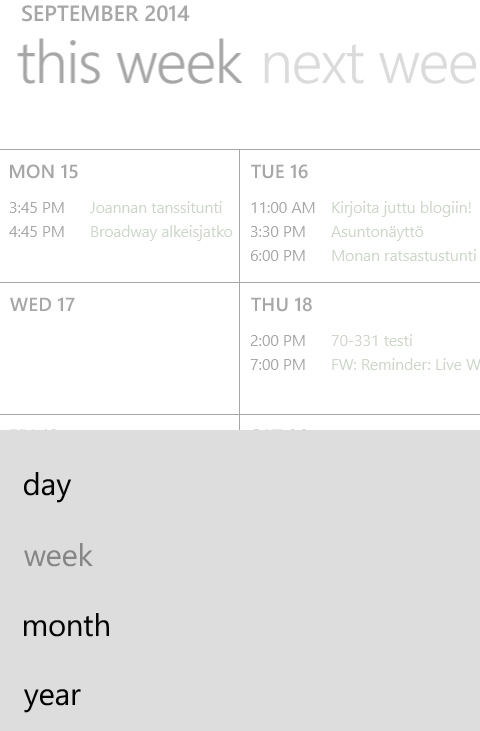
After getting my calendar back, I have to say I like the new and enhanced Windows Phone native calendar with the week view and all. The old calendar constantly agravated me with the slide list view that made it difficult to see whether there were appointments on s specific day or not. It required more than a glance. This new look and feel is nice. There's the options (behind the right-most button on the bottom) to switch from week view to month/day/year views. And it shows some weather data for the upcoming days too, if you allow location on the calendar.


(Oh, we have cool days coming up... autumn is here.)


Summa summarum, I definitely do not regret upgrading my phone despite the need for a factory reset to get it all properly working. I'm quite happy with all the improvements!


Oct 27, 2013

Upgrading to Lumia 820

Last week I grabbed the opportunity to upgrade my phone (at least for the time being) from that faithful snowwhite Lumia 800 that's accompanied me to so much, and taken a *few* hits along the way to a new white Lumia 820. Oh, I know it's not a new model anymore, and that there're newer Nokias available, and that it's not high-end, and that there's newer iPhones availble too. But I like the Lumias, and I like the smaller size phones, and as a phone user, I'm not really that demanding.

I think I have listed before the features I most use on a phone (apart of using it as a phone and for texting), but let's approach the Lumia 820 from this point of view. What do I expcect from and appreciate in a phone, and how does the Lumia 820 meet those.

  • Email. No matter how much the media shouts that email is sooo last year because of Lync and Skype and whatnot, it's not. I love both and more, but I could not imagine working in a way where customers Lync m every time they have something to ask or say. Seriously! I need my peace to work. Email gives me the freedom to react when the time's right for me. And it may be in the bus or on the lake side or the sofa in between two episodes of Breaking Bad. And that goes for personal email too. I don't think I need to be available 24/7 - and besides, people can always call me.

As for Lumia 820, it meets my requirements as well as any current smartphone. Nothing new, but then again, no bigger needs either, than to be able to read and reply, search and sync. And I like it that the WinPhones separate different email accounts by deafult, unlike e.g. the iPad.

  • Calendar. I'd be lost without it! I use only one calendar, the Outlook one on the company Exchange server. I use it for work stuff and personal stuff alike. No matter how well Googles and Hotmails and whatnot claim to be able to merge their calendars on different devices into only one, I have realized that for me, this is the only real option in order to keep my mind from being scattered.

Lumia (either one) actuallky would handle the merging ok, but I still want only one calendar. And that is just fine by the phone too ;)

  • Camera. I have a semi-proper camera I use mostly. A Samsung Pro with an ok lense and possibilities for quite ok photos (yes, I'd like a better one, but it's on the very bottom of the priority list of things I'd need or want, because it still works ok for my purposes). And I have a pocked model, some years old cheapie I got in the middle of my divorce, just to have something. That one I use quite rarely. Even more so, since the phone cameras are now more or less as good.

The camera is one of the best features in Lumia 820. It comes with a high-res 8MP camera with focus assist light (a feature well appreaciated by me, for it enalbes taking good quality photos in lesser light without needing to use the flash), options to select the ISO and choose between 16:9 or 4:3 aspect ratio and a few other settings. For a more detailed review, see this TechRadar article about Lumia 820 camera.

Lumia 820 also has an inbuilt (or downloadable, but at least for me, they were readily available) set of different photo lenses, or apps, such as the Nokia Panorama which proved to be a pretty able panorama photo app, Nokia Cinemagraph for creating animated photos (but I think you can only see the effects in the app, not elsewhere) and Nokia Smartcam, with fun effects for capturing movement and then applying one of several ways of handling it, e.g. removing a moving object, or overlapping the frames.

And you can download plenty more.

  • Skype and WhatsApp. I don't launch Lync on my phone almost ever, but I do use Skype on my phone occasionally (my mother lives on the other side of the world) and WhatsApp is the messaging app of choice for my daughters, ever since they had an almost 100€ SMS bill. So I, too, started using it with them, and a few others as well.

As for WhatsApp, it's just WhatsApp. But as for Skype, Lumia 820 has a front camera unlike the 800. And the incoming video was clear and sharp, unlike on ANY other device I've skyped on before!

  • News, both tech and world&local. I used to use Pulse on my phone, for lack of Flipboard. For quite some time now, the phone usage for news has been very rare, for I've used the combination of my iPad and the phone internet sharing in the morning bus. So last time I tried to read the tech news on my phone, I realized there was no Pulse no more. I downloaded Tech News Now app, and actually like it better. Also, I read the local news on Hesari app, and world news in Google news, using the browser.
Lumia 820? Not much difference, naturally. Except for the bigger screen, while the phone is still sleek.
  • OneNote, Googling, Kindle, occasional Youtube, Facebook, Twitter... Apps, apps, apps. Apart from the bigger screen, nothing special about Lumia 820 for those.

Conclusion? I fell in love with the clear a bit bigger screen and the camera - all the while understanding that there are even better ones availbale. I like the little niche feature improvements of WinPhone8 compared to 7.8. Mostly just more options in the settings and such. Oh, and the possibility to use removable storage! Which brings me to my first frustrating encounter with the phone: I needed to refer to the manual to understand where to insert the SIM; you actually need to take the back cover (and the battery) off.